Otime.
UX Design.
Visual Design.
Ops Tool.
Designing an internal operations platform for supervisors managing student transportation across campuses and routes replacing fragmented WhatsApp coordination with a structured, hierarchical system that makes the right information visible at the right time.
Where Otime Fits?
ZeroMoblt has three layers: a Parent App for tracking student commutes, a Driver App for managing routes, and Otime the internal ops layer used by supervisors, vendors, and operational staff. Otime is what keeps everything else functioning reliably.
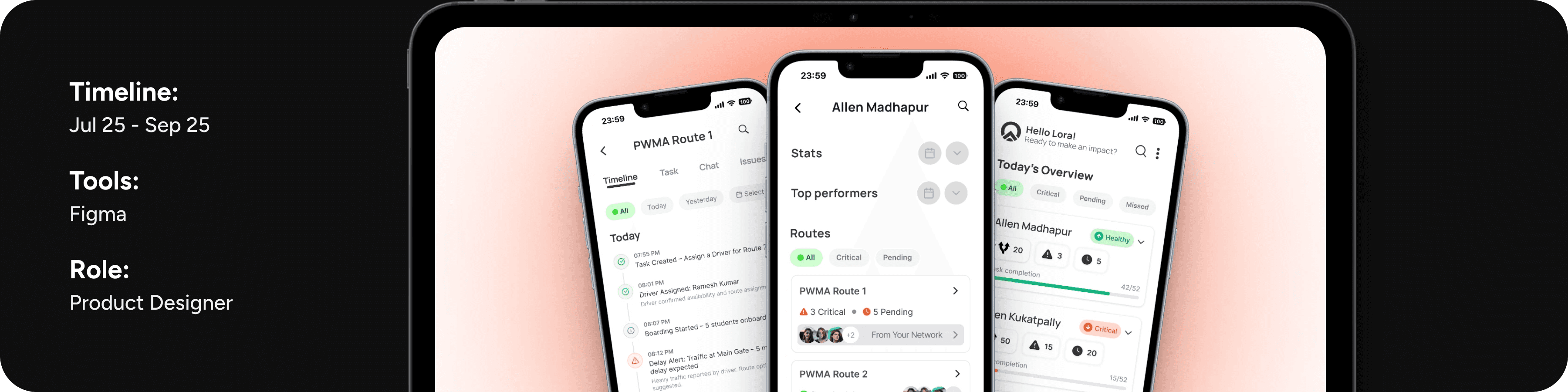
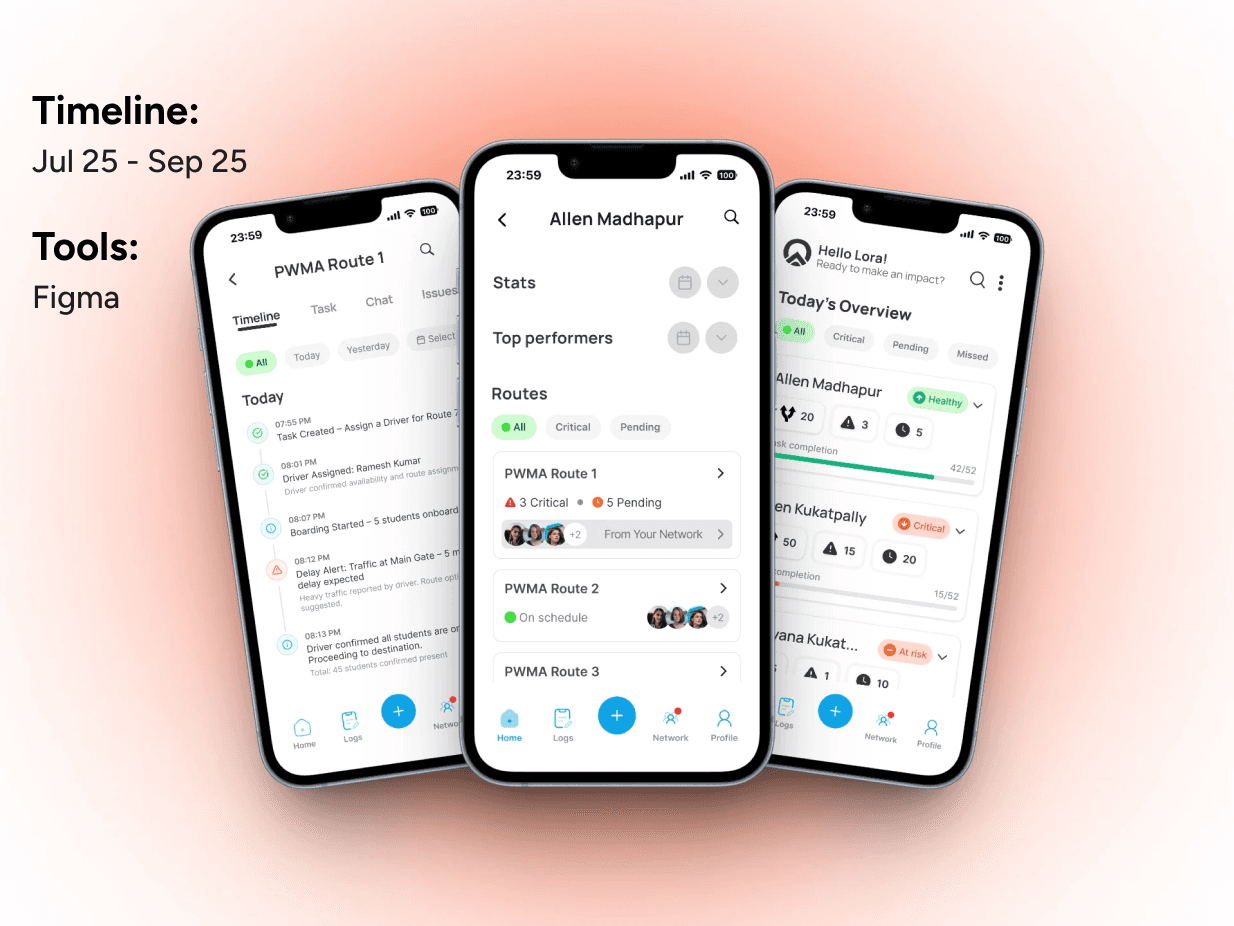
Overview.
ZeroMoblt operates student transportation across multiple campuses in India. Every morning, drivers pick up students, supervisors coordinate routes, vendors manage assignments, and trackers monitor progress. When it works, nobody notices. When something breaks a driver is late, a student misses boarding, a route hits traffic the entire chain needs to respond fast.
Before Otime, that response happened through WhatsApp group chats, phone calls, and individual memory. A supervisor managing 20 routes across 3 campuses had no structured way to see what was on schedule, what was critical, or who was already handling what. Finding a single update meant scrolling through hundreds of threads.
Otime was built to replace that fragmentation with a structured ops platform giving supervisors a single place to monitor campuses, track route health, manage tasks, and resolve issues in real time.
My Role.
UX and visual design:
I joined ZeroMoblt as a Product Designer in June 2025 and worked on Otime alongside one other designer throughout the project. We contributed equally, often exploring the same screens independently before combining our strongest ideas with the founder's feedback.
User flow mapping
Mapped the end-to-end operational journey across all four hierarchy levels based on the BRD. This included the critical early work of identifying the right primary user a process that took weeks and shaped the entire product direction.
Campus level — route cards
Designed compact route cards prioritizing urgency signals and direct access to contacts. Explored the trade-off between scan speed and information depth.
Route level — Timeline and Issues tabs
Designed two distinct tabs serving two different supervisor modes: passive monitoring and active incident resolution.
Supporting screens — Logs, Network, Point of Contact, Collaborators
Restructured the information architecture and card hierarchy across these screens. Built the reusable contact card component used across multiple screens.
Challenge.
The product had no clear primary user.
The Business Requirements Document described the system from five different stakeholder perspectives Vendors, Supervisors, Shifters, Trackers, Drivers. Everyone's needs were documented. Nobody's needs were prioritized.
Different stakeholders described the system differently. The founder was still working through the product vision as we designed. And my co-intern and I were exploring the same product from independent directions simultaneously.
"The challenge wasn't figuring out what to design. It was figuring out who we were designing for and that took weeks of the wrong work before we found the right answer.”
My early explorations started from the Supervisor's perspective, but I was interpreting them as task executors people completing discrete operational actions. The real insight came later: supervisors weren't executors. They were monitors. The person who most needed this product wasn't someone doing one task at a time. It was someone trying to see 20 routes across 3 campuses simultaneously, with no visibility into what was on schedule, what was breaking, and who was handling what.
Once we named that clearly, the entire product structure followed.
Approach.
Read the BRD. Map the stakeholders. Understand how a student trip actually works end to end and where it breaks. This gave us the vocabulary to design with.
My co-intern and I explored the same screens separately, then compared. The divergence in our approaches revealed the product's open questions more clearly than any brief could have.
We brought early lo-fi screens into founder reviews not to present solutions, but to pressure-test assumptions. A screen that's wrong teaches you more than a document that's vague.
Once the structure was clear, I shifted from designing individual screens to building reusable components that could compose consistently across the product as it scaled.
The Decisions.
Decision 01
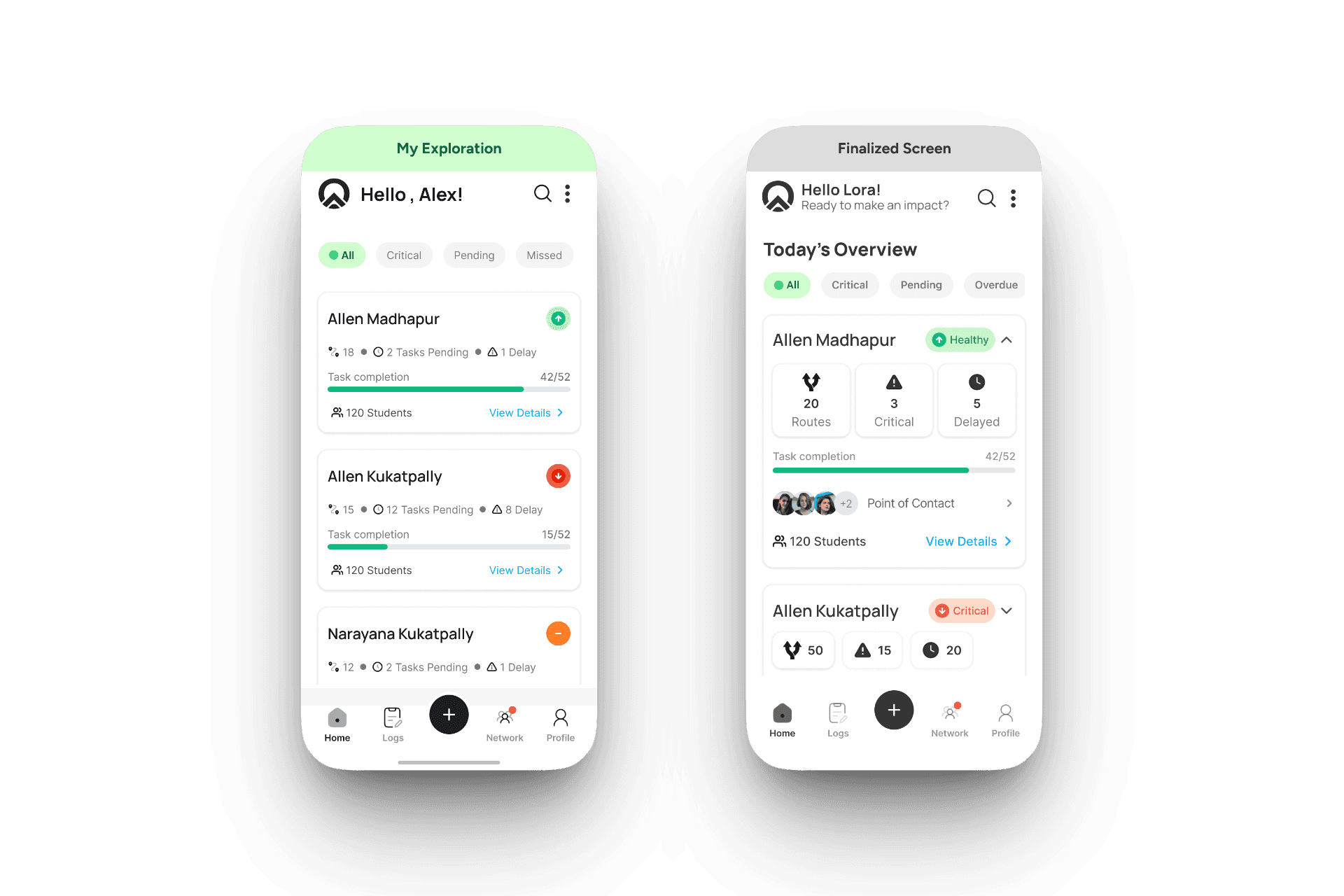
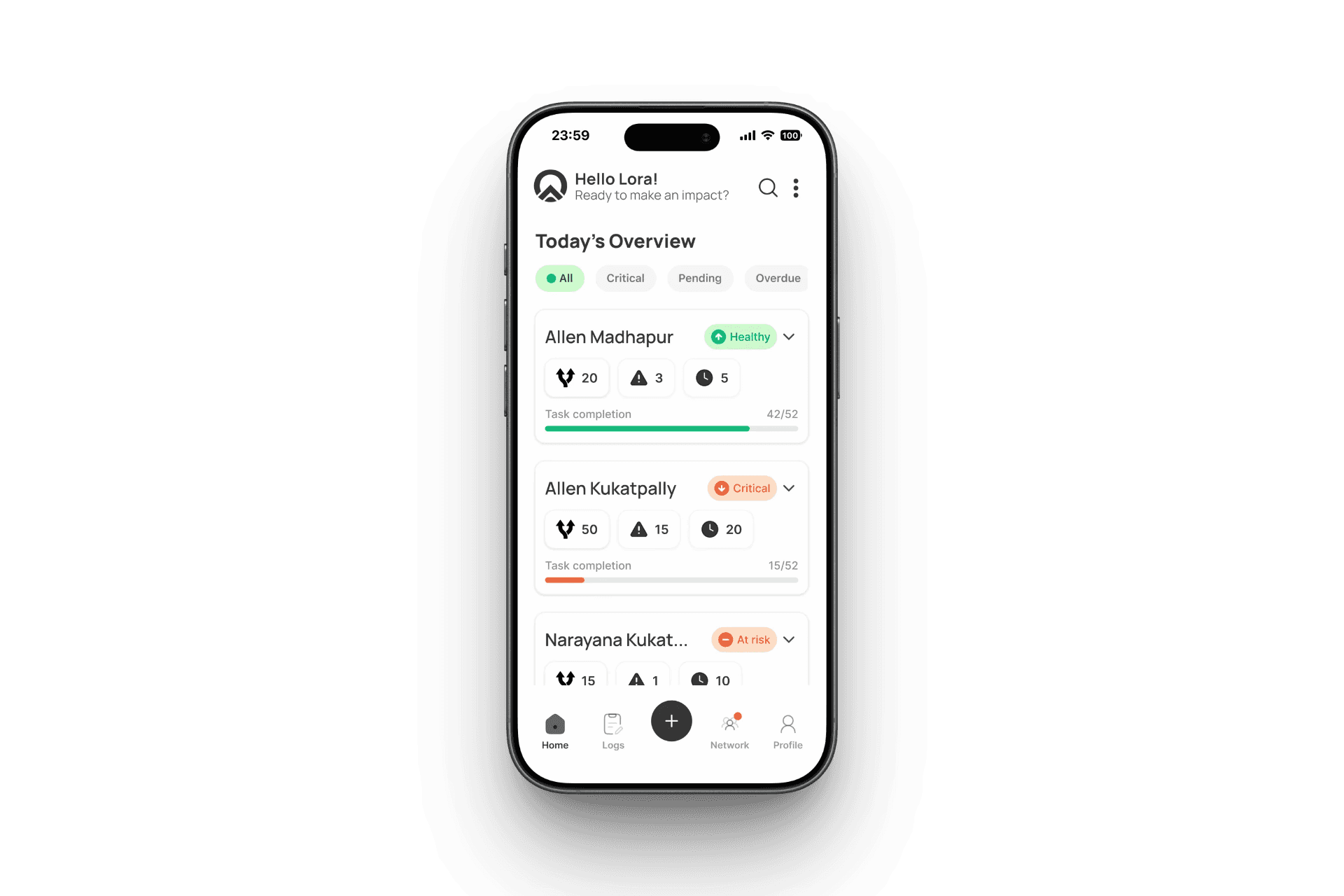
The home screen is what a supervisor sees 15 times a day at the start of a shift, between calls, when something feels off. The question I kept asking: how do you communicate the health of 8 campuses in a single glance?
My answer was a single color-coded status icon per campus card. Green arrow up for healthy. Red arrow down for critical. Orange minus for at risk. The icon answers the primary question before the supervisor reads a word. Supporting data route count, tasks pending, delays, progress bar, student count sits beneath for context. The goal was to let someone scan all campuses in under 5 seconds.
The finalized direction used an expanded card with a metric grid (Routes / Critical / Delayed as separate tiles) alongside the progress bar. More data visible at once but each campus requires the supervisor to parse multiple numbers to reach the same health assessment that the icon communicates instantly.
Trade-Off
My version: one signal, instant read, low cognitive load. Finalized version: richer data upfront, more context per campus without drilling down. If supervisors are making fast go/no-go decisions across many campuses, speed matters more. If they regularly need the numbers at a glance, density matters more. Both are valid but they're solving different problems.
Decision 02
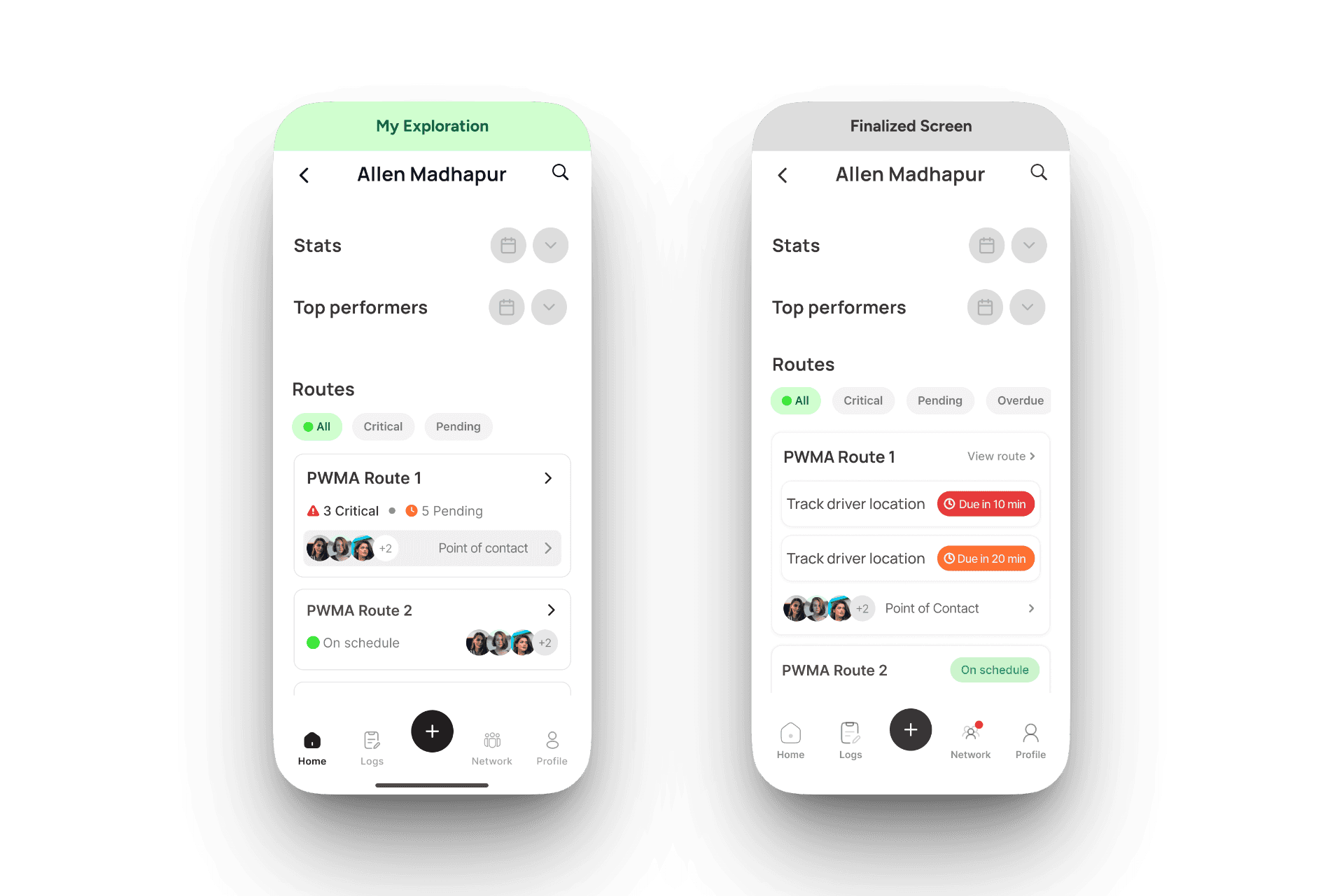
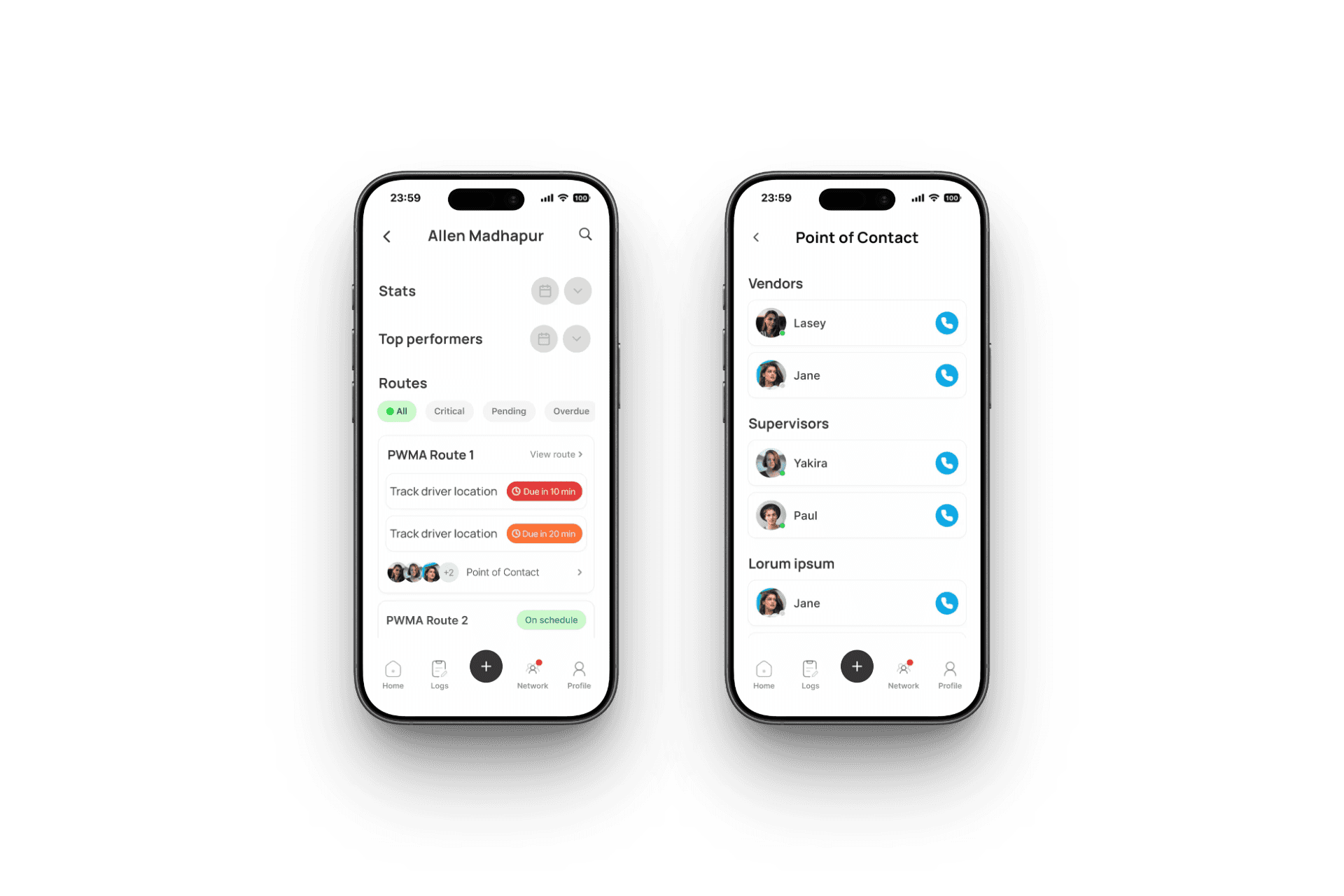
Inside a campus, a supervisor sees a list of routes. The one question they need answered per route: does this need my attention right now? Not which specific tasks are due. Not what the countdown timers say. Just: critical, pending, or fine.
I designed route cards to answer exactly that. A critical route shows "3 Critical · 5 Pending" with Point of Contact immediately accessible. A healthy route shows "On schedule" in green and collapses. Task detail belongs one level deeper on the route screen, not the campus screen.
The finalized direction surfaced individual task names with countdown timers directly on campus-level route cards ("Track driver location · Due in 10 min"). The argument for it: supervisors can assess urgency without drilling down. The risk I see: task-level information at the campus level blurs the hierarchy, and as the list grows, the campus screen becomes harder to scan.
Trade-Off
Hierarchy purity vs. shortcut access. My version keeps each level responsible for one decision. The finalized version trades some structural clarity for faster access to task context. Whether that's the right trade depends on how supervisors actually use the screen in practice something only real usage data would answer definitively.
Decision 03
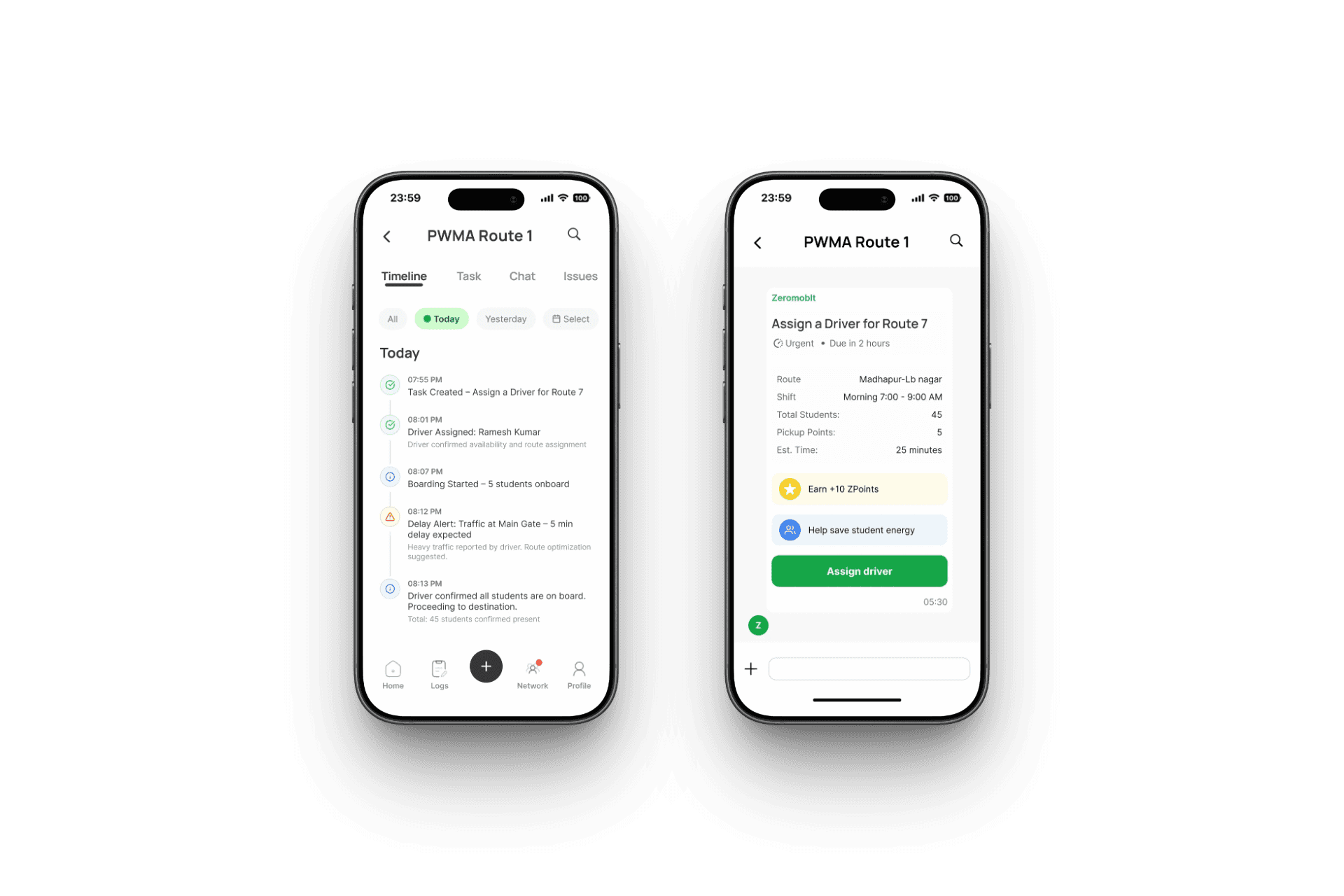
When a supervisor opens a route, they're in one of two mental states. Either they're monitoring reading what happened, checking progress, staying informed. Or they're resolving something has gone wrong and they need to act fast.
Mixing both into a single feed means a supervisor under pressure has to scroll past routine updates to find the one incident that needs their response. Every extra second matters when a bus is delayed and parents are waiting.
I separated them: Timeline for the passive event log, Issues for active incident tracking. A supervisor can jump straight to Issues without touching the Timeline. The Timeline becomes an audit trail. The Issues tab becomes the action surface.
"Good information architecture doesn't just organize data it protects attention. Keeping monitoring and resolution separate means less time searching, more time deciding."
Interface.
The screens.
The product organized into four hierarchy levels: Campus, Route, Task, Action, with supporting screens for Logs, Network, and Profile.
Campus Overview
The home screen. Supervisors see all campuses at a glance status, task completion, and quick access to routes.
Campus Operations
Inside a campus, supervisors see all routes with urgency signals and direct access to Point of Contact.
Route Operations
Two distinct tabs for two supervisor modes, Timeline for passive monitoring, Issues for active resolution. Task detail and assignment within the route.
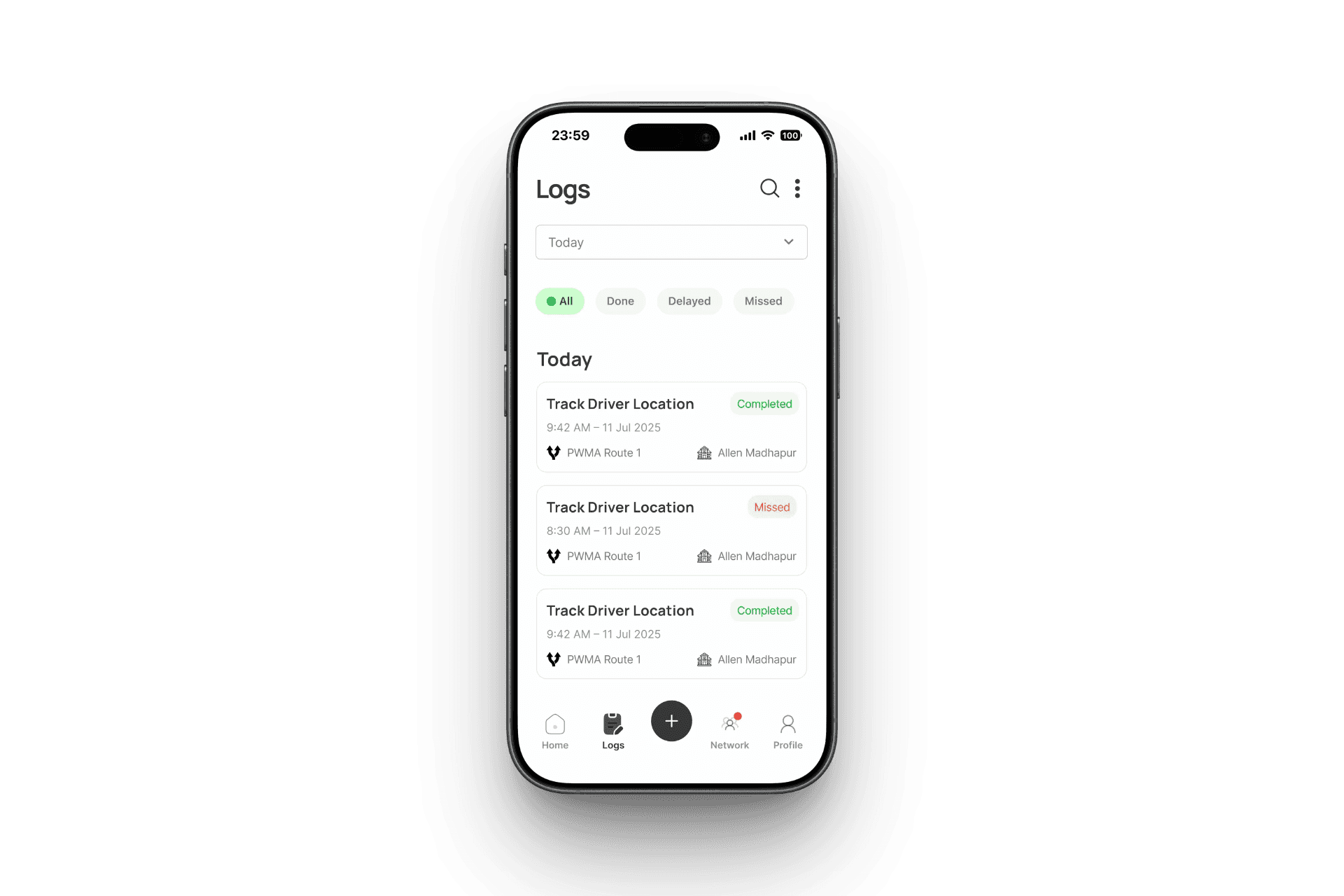
Logs
A full record of completed, missed, and delayed tasks, filterable by status, date, route, and campus.
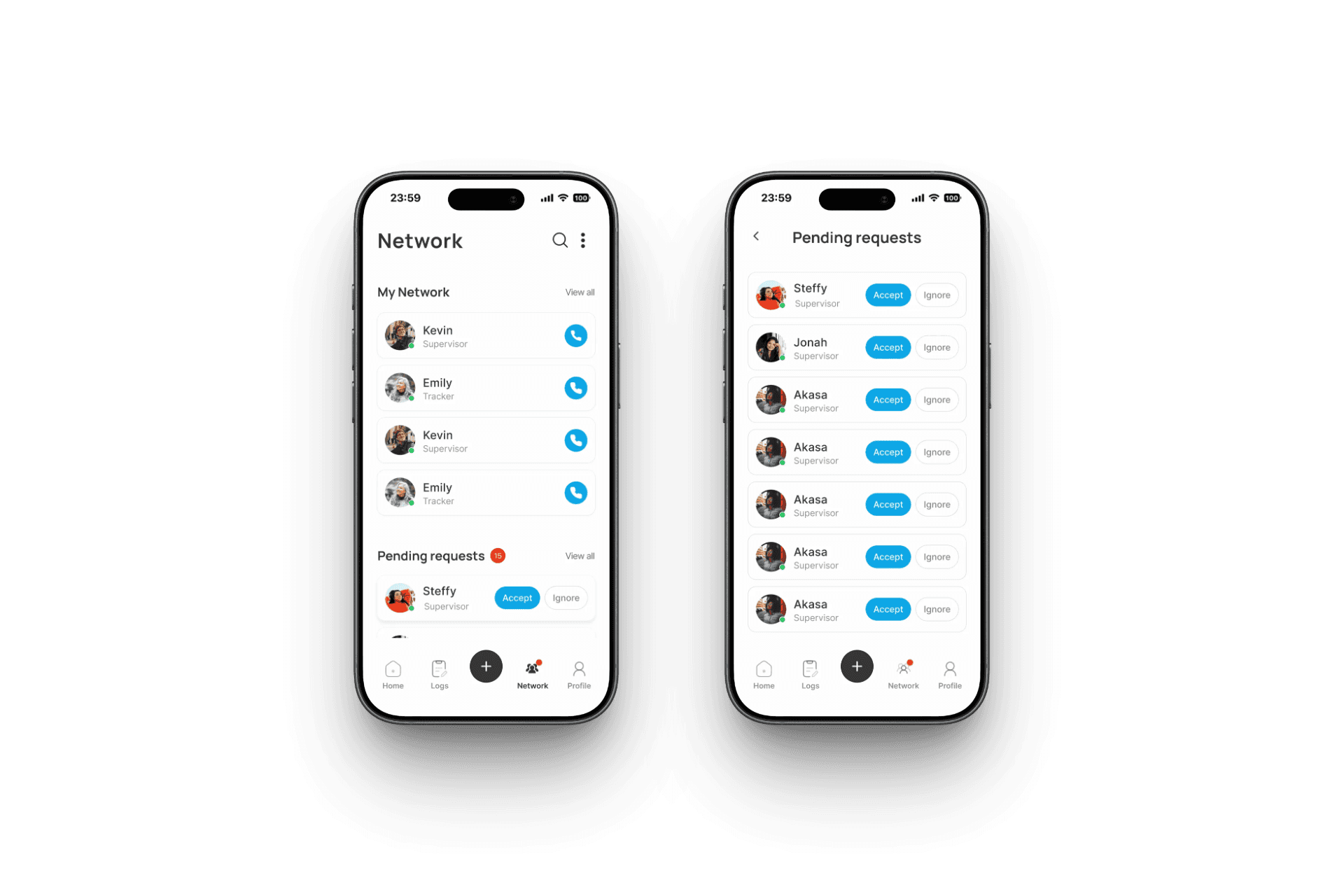
Network
Supervisors see their operational network, manage pending requests, and discover suggested collaborators.
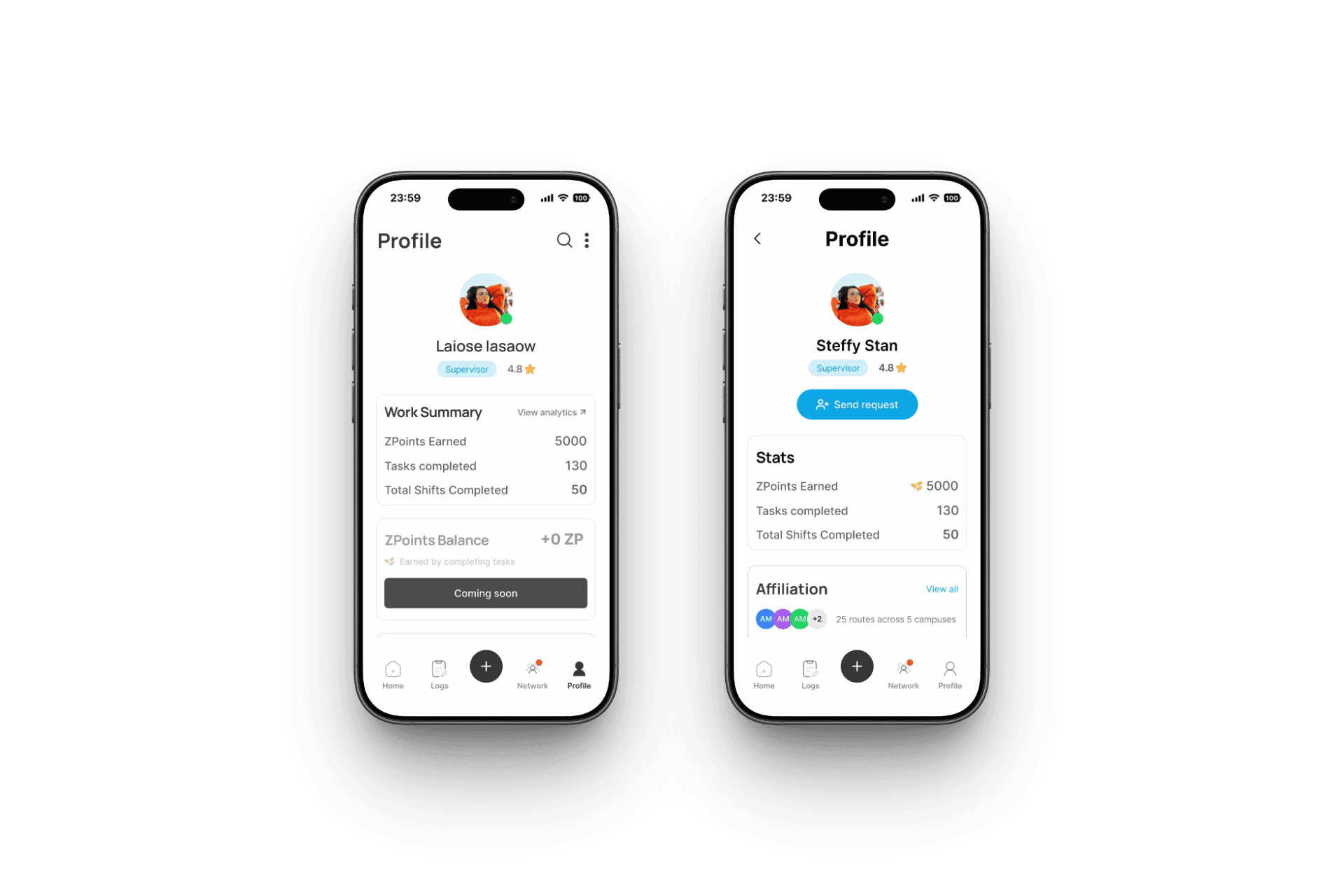
Profile
Work summary, ZPoints balance, and affiliation across campuses and routes.
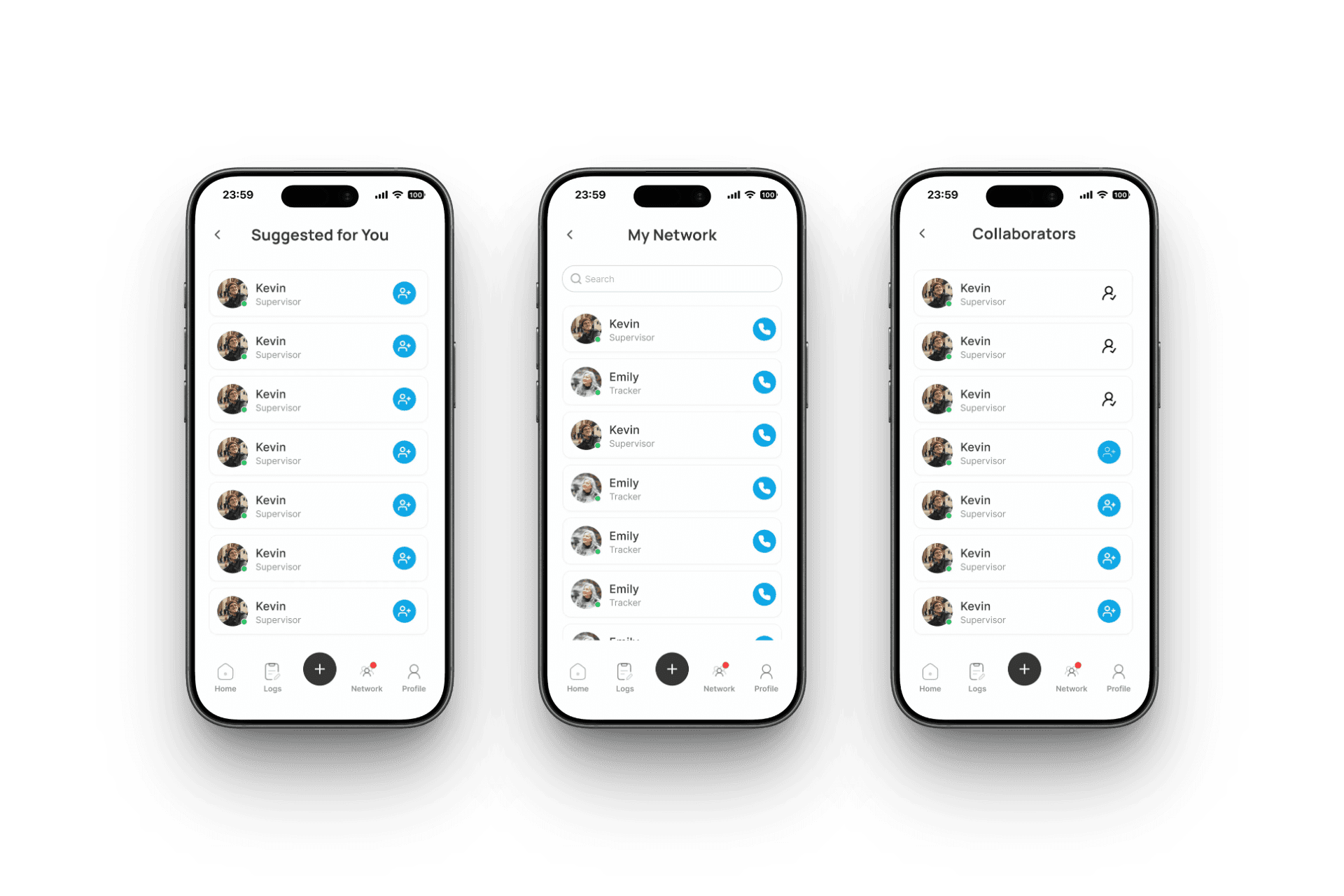
Supporting Screens
Collaborators, suggested connections, and pending network requests all built on the same reusable contact card component.
Learnings.
Design instinct without articulation is invisible:
I had clear reasons for my design decisions but when those decisions were challenged in reviews, I could not always express them with enough clarity and structure to hold the room. The designs I felt strongest about were sometimes overruled not because they were wrong, but because I had not built the habit of externalizing my reasoning as I worked. That gap between intuition and articulation is the thing I am most actively working on.
User alignment before any design work”
The weeks we spent exploring the Shifter perspective were not wasted they helped us understand the system. But we could have reached the Supervisor insight much earlier with a simple, explicit question: who is the primary user and what is the one problem we are solving for them? I would now treat that as a non-negotiable before opening Figma on any ambiguous brief.
Document decisions as you make them:
Six months later, I cannot recall every rationale behind every screen. The designs exist. The thinking behind them is mostly gone. Going forward, I keep a lightweight decision log alongside my Figma files not for process, but because the reasoning is as important as the output when it comes to presenting work and growing as a designer.
Iteration with a collaborator reveals what you can't see alone:
Having a co-intern explore the same screens independently was one of the most useful parts of this project. Where our designs diverged, the product's open questions became visible. Disagreement is a design tool.
Conclusion.
This is a Collaborative Project!
Otime was designed by two designers with equal contributions throughout. The screens above represent my specific explorations, decisions, and components some of which made it into the final product, some of which informed it without being adopted directly.
My lane was clarity under pressure. Designing for the supervisor who has 20 things happening at once and needs to know, in under 5 seconds, which one needs them right now.
The product is still in active development at ZeroMoblt and has not launched yet.